Staff performance
See how each server's shifts really went.
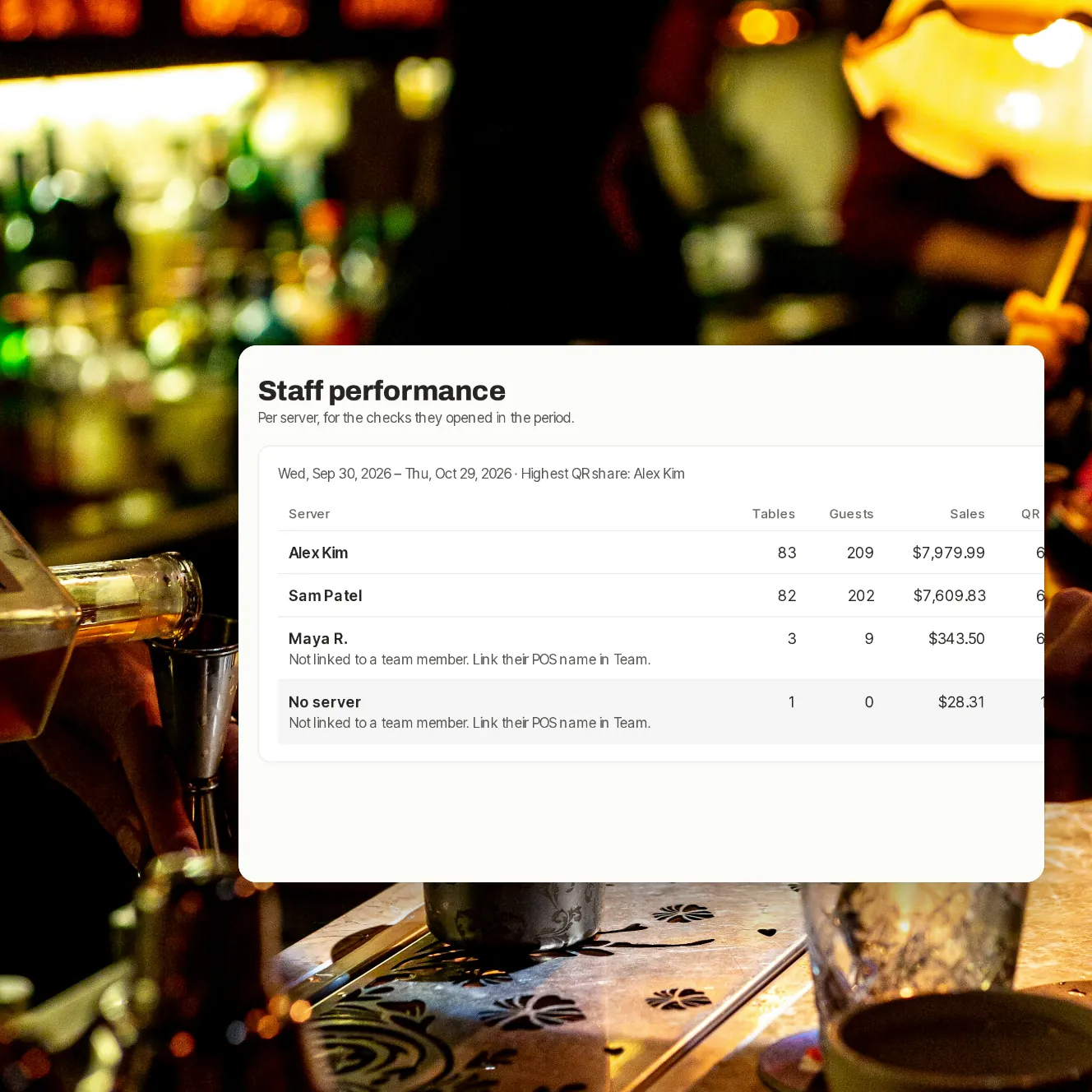
Every check on your POS has a server. Paytabl puts their tables, guests, sales, tips and the ratings guests left side by side, over the last 7, 30 or 90 days.
- 8
- numbers per server, side by side
- 7, 30, 90
- days to look back over
- Every
- rating kept, low scores included
Coaching from facts, not hunches.
One line per server
Tables, guests, sales, the share paid by QR, tips, the tip rate, the average rating and how many ratings.
From your POS
Servers are matched to their checks by the name on your POS, set once per person on the Team page.
Ratings by server
Each rating in the dashboard shows who served the table, with the guest's comment.
Who's ahead on QR
The page names the server with the highest QR share for the period.
The week in your inbox
Owners and managers can get the week's numbers by email every Monday, and yesterday's every morning.
Servers see their own
In the staff app, each server sees their own tips and the payments and ratings on their tables, as they happen.
Where the numbers show up.

Step 1 of 4
Staff performance
Every server, over the last 7, 30 or 90 days.

Step 2 of 4
Ratings, with who served
Each rating and comment, with the server's name.

Step 3 of 4
Emails you choose
A daily summary and a weekly report, switched on or off per person.

Step 4 of 4
On each server's phone
Their tips today and this week, table by table.
Good to know.
Unlinked names, flagged
A POS name not linked to anyone on your team is shown as such, with how to fix it.
Per venue
Each venue has its own page; switch venue at the top of the dashboard.
Who can see it
Owners and managers. Servers see their own tips in the staff app, not this page.
Tips stay private
How the tip pool is shared stays on the tips pages, for owners and tips managers.
Your questions
Where do the numbers come from?
Sales, tables and guests come from the checks Paytabl has read from your POS. Tips, QR payments and ratings come from what guests did through Paytabl.
Does it count bills paid by card at the terminal?
Sales, tables and guests include every check Paytabl has read from your POS, however it was paid. Tips and the QR share count what was paid through Paytabl.
Do servers see each other's numbers?
Not on this page: staff performance is for owners and managers. In the staff app, servers see the tables and their bills and payments, and their own tips under My tips.
What does the weekly email include?
The venue's week: sales, the share paid by QR, tips and ratings. The line per server is on the dashboard page.
Book a demo
Let's set it up for your restaurant.
Tell us about your restaurant and we'll walk you through Paytabl on a live demo bill: the guest's phone, the staff app and the dashboard, with your POS in mind.